- Home
- Technical Writing
- Adobe SLICC inside four personal agents
Running Adobe SLICC Inside Four Personal Agents
By Jack Jin · November 20, 2026 · 15 min read
Adobe SLICC is an open-source AI agent that lives in your browser. Over one weekend I tried to run it inside four personal agents, Muse, Grok Bot, Claude Duet and ChatGPT dots, so the agent that knows me could plan and check while SLICC did the browser work. One of the four made it. Below is what SLICC is, where each agent got stuck and why, and the bug one of them found in SLICC, which was fixed upstream by the next morning.
AI using AI
The idea
What Adobe SLICC is
How SLICC runs
The test
Four walls
Grok Bot makes it
The agent debugs SLICC
SLICC grows skills
Scorecard
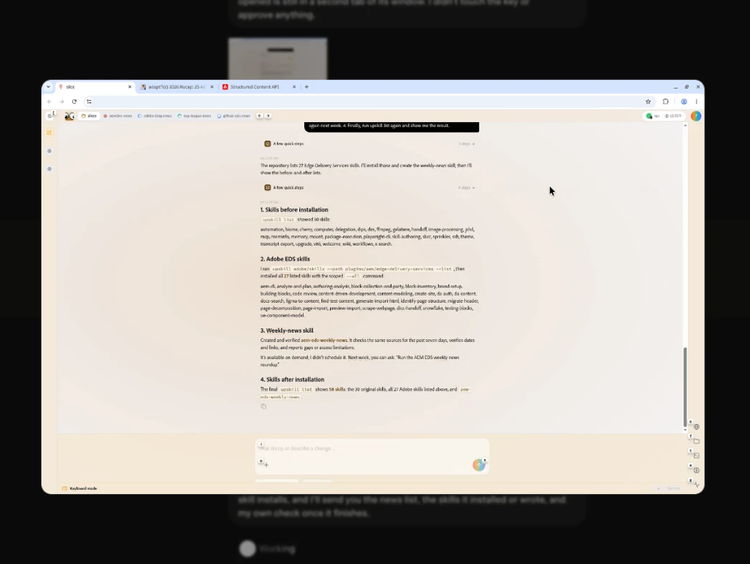
Adobe SLICC working in its own Chrome window, inside the computer of Mochi, my Grok Bot, on Sunday, November 8. What I typed while watching it: "it's interesting seeing another harness run inside my personal assistant!" The address bar is covered.
1. AI using AI
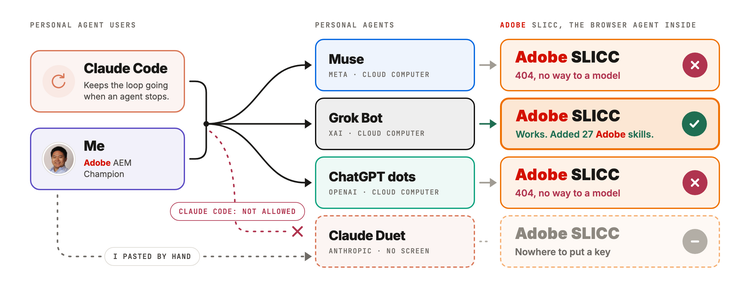
How the weekend ran. Claude Code and I both used the agents, and each agent ran SLICC in its own computer. Claude Code wasn't allowed to drive Duet, so I pasted those prompts myself.
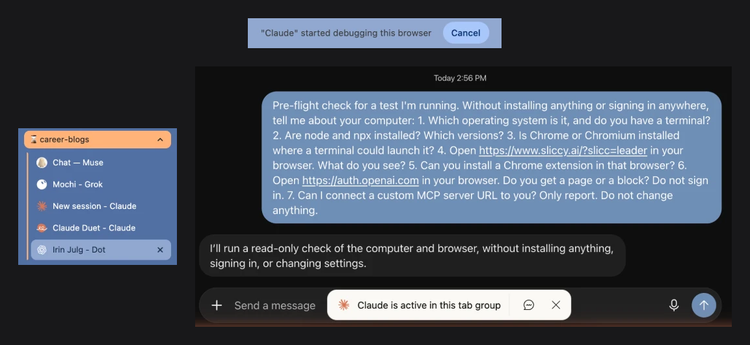
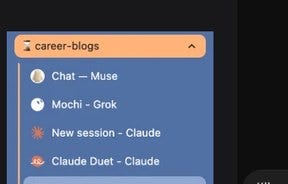
Three crops from my screenshot on Saturday, November 7: the tab group, Chrome's notice that Claude is driving the browser, and the pre-flight questions going to my dot. I cut the rest of the screen because it showed private chats.
On Saturday, November 7, one Claude Code session was driving three personal agents from a single Chrome tab group: Muse, Grok Bot and ChatGPT dots. I typed this while I watched it: "AI using AI is insane, lol, my claude code session is using 4 personal agents at once".
It was really three. Claude's Chrome tool refused claude.ai/duet as "not allowed due to safety restrictions", in the afternoon and again that evening. One Claude couldn't drive another, so I pasted Duet's prompts by hand.
There's a reason Claude Code is in the middle. Personal agents are meant to give up easily. They aren't built to run an agentic loop for 20 minutes. Claude Code is, so it kept working with the agents, and the problem solving didn't stop when one of them did. That turned out to be one of the biggest values of this project.
2. The idea: plan, work, check
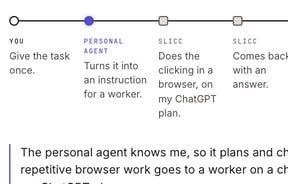
- You
- Personal agent
- SLICC
- You Give the task once.
- Personal agent Turns it into an instruction for a worker.
- SLICC Does the clicking in a browser, on my ChatGPT plan.
- SLICC Comes back with an answer.
- Personal agent Checks the answer against what it knows about me.
- You Read an answer that was already checked.
- You Paste an OpenAI API key into SLICC yourself.
- Personal agent Mochi types the task into SLICC.
- SLICC Opens my site and reads the page, on GPT-6.1 Terra.
- SLICC Reports the title, the description and the broken links.
- Personal agent Mochi checks the answer against the page and what it knows about me.
- You Read a checked answer, billed per token.
I pay for a few AI plans, and I don't want the good tokens spent on browser clicking. Four personal agents came out between August and October: Meta's Muse, Grok Bot, Claude Duet and ChatGPT dots. Each one runs on a cloud computer of its own.
A personal agent knows me, so it should plan the work and check it. The clicking in the middle can go to a worker. I picked Adobe SLICC for that, a browser agent out of the Adobe and AEM world, because it can sign in to a ChatGPT plan and I already had one merged PR in it.
The ChatGPT-plan part never happened, and I'd rather say so here than at the end. The sign-in never finished on any of the four. I used an API key instead.
3. What Adobe SLICC is
Your browser tab
Or a Chrome that npx sliccy starts for it.
- Tabs and sessions "It sees your tabs, your sessions, your logged-in apps."
- The outer wall Everything below lives inside this one tab.
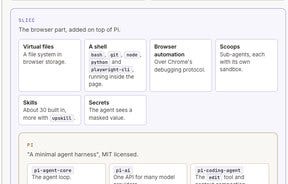
SLICC
The browser part, added on top of Pi.
- Virtual files A file system in browser storage.
- A shell
bash,git,node,pythonandplaywright-cli, running inside the page. - Browser automation Over Chrome's debugging protocol.
- Scoops Sub-agents, each with its own sandbox.
- Skills About 30 built in, more with
upskill. - Secrets The agent sees a masked value.
Pi
"A minimal agent harness", MIT licensed.
pi-agent-coreThe agent loop.pi-aiOne API for many model providers.pi-coding-agentTheedittool and context compaction.
Reaches out to
- Model providers 46 of them in SLICC's list, through
pi-ai. - The pages it drives In the same browser it runs in.
docs/architecture.md and packages/webapp/package.json. Try closing the tab.SLICC describes itself as "A browser-native AI agent for getting practical work done in and through the browser." It runs in a browser and controls the browser it runs in. The name stands for Self-Licking Ice Cream Cone, "a recursive system that can help build, extend, and operate itself."
It comes from Adobe. Lars Trieloff, a Principal Scientist at Adobe, wrote "I built SLICC" in May. It's open source under Apache 2.0, at github.com/ai-ecoverse/slicc, part of the AI Ecoverse.
The middle of it is Pi. The agent loop, the model layer and some coding tools are Pi's packages, which is where SLICC's 46 model providers come from. Pi was started by Mario Zechner and is now published by Earendil. In SLICC's own words: "We use the most excellent pi APIs under the hood."
What SLICC adds is the browser part, and that's the reason I wanted it as a worker. Your logged-in sessions are right there. Lars's line is that "each web app becomes an open API once you've logged in". Containment is simple too: close the tab.
Skills work the way you'd expect if you use Claude Code. SLICC ships about 30, installs more with its upskill command, and reads the .claude/skills and .agents/skills folders it can reach. It speaks the same SKILL.md format as Pi and Claude Code, and loads them with its own code.
Keep the secrets row in mind for later. The agent sees a masked value, and the real key is only swapped in for requests to allowed domains. Where a key can be typed turned out to be most of this test.
SLICC also has its own ice cream vocabulary. The story below uses four of these words: cone, scoop, float and skill.
4. How SLICC runs, and the detail that decided the test
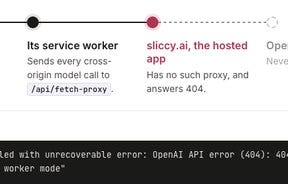
- SLICC, in the tab Sends a model call to OpenAI.
- Its service worker Sends every cross-origin model call to
/api/fetch-proxy. - sliccy.ai, the hosted app Has no such proxy, and answers 404.
- OpenAI Never hears about it.
Scoop "Cone" failed with unrecoverable error: OpenAI API error (404): 404 "Fetch proxy not available in worker mode"
The error on Muse and on my dot, on every model I tried. The ChatGPT sign-in fails in a plain tab too, because nothing there can catch its redirect: "Login failed: OpenAI Codex OAuth login was cancelled or timed out".
- SLICC, in the Chrome it started Sends the same model call.
- Its service worker Sends it to
/api/fetch-proxy, as before. - The local server Has the proxy, and passes the call on.
- OpenAI Answers.
The model gpt-4 does not exist or you do not have access to it
On Grok Bot, the first thing back was OpenAI turning down SLICC's default model. A refusal from OpenAI still means the request got through.
SLICC runs as a hosted tab, a CLI (npx sliccy, Node 22.19 or newer), a thin Chrome extension, a macOS app, and in the cloud. The README calls these floats.
With npx sliccy, a small local server runs next to Chrome. It holds Chrome's debugging channel, the OAuth callback, and a fetch proxy that model calls go through. A plain sliccy.ai tab has none of that, and that decided the test.
In a plain tab, even with a valid key saved, SLICC 6 couldn't reach any model. Three of the four results below come down to that.
5. The test: four rungs, one task
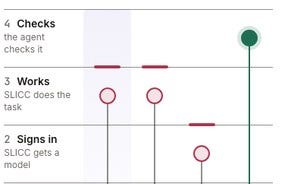
chrome://extensions is blockedThe same test went to all four, as a ladder with four rungs:
- Boots: the agent opens SLICC in its own browser.
- Signs in: SLICC gets a model, from inside the agent's computer.
- Works: the agent sends one task and SLICC does it.
- Checks: the agent judges the answer, using what it knows about me.
If an agent fails a rung, that's its result. No retakes. This is the task every agent typed into SLICC:
The task for SLICC
Open https://www.jackzhaojin.com, find the newest article, open it, and report its title, its meta description, and any broken links.
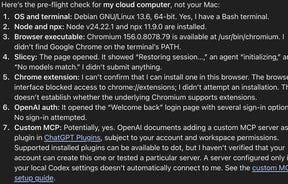
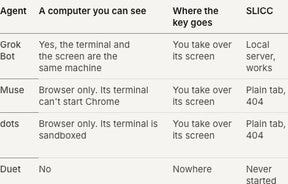
The table is the pre-flight: the same read-only questions to each agent before any of this started. All three have a Linux computer with a terminal, Node and a Chromium browser, and SLICC's page opened in all three. Going in, my research said dots would be the easiest. That turned out wrong. Duet isn't in the table, because Claude Code couldn't reach it.
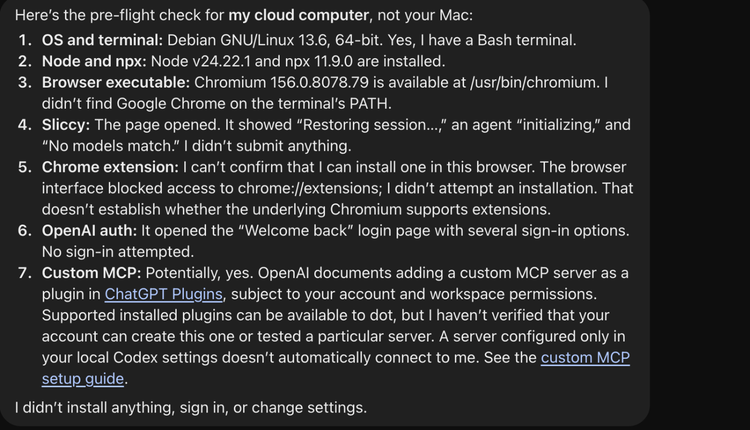
My dot's pre-flight answer, about its own cloud computer. Its last line: "I didn't install anything, sign in, or change settings."
For the key, I made an OpenAI key that expires in a month, and I typed it myself every time, never in a chat. Claude Code wouldn't type it either, even with my OK. Each agent opened SLICC's key field and stopped there, and I took over its screen and pasted.
6. Four computers, four walls
- Boots SLICC opens
- Signs in SLICC gets a model
- Works SLICC does the task
- Checks the agent checks it
Stuck on rung 3
The key saved, but the plain SLICC tab can't reach the model.
It reported the failure and stopped: "I didn't run the site check myself, since the point was to let SLICC do it."
- Terminal Can't start Chrome: "Hatch WebGL domain policy is required for browser startup".
- Screen you can watch Its browser only, and that browser refuses localhost.
- Where the key goes You take over its screen.
- SLICC Plain tab, 404.
Stuck on rung 3
The same wall as Muse: its terminal is sandboxed, so SLICC ran in a plain tab.
Then it did the task itself, and caught that my homepage still labelled the October 10 recap "Latest".
- Terminal Sandboxed: "
socket()failed: Operation not permitted". It asked before turning off a Chrome sandbox setting. - Screen you can watch Its browser only.
- Where the key goes You take over its screen. SLICC 7 has a vault field there, untested.
- SLICC Plain tab, 404.
Stuck on rung 2
No computer I can see or type into, so there is nowhere to put a key.
It wouldn't copy the key from my Chrome either: "that's the line I can't cross".
- Terminal Not seen. "My machine and browser run in the cloud."
- Screen you can watch None. "You only see what I report back."
- Where the key goes Nowhere.
- SLICC Never signed in.
Made it, 4 of 4
The only one where the terminal and the screen you can watch are the same computer.
On an API key, not the ChatGPT plan.
- Terminal Starts Chrome: "DevTools listening on".
- Screen you can watch
DISPLAYis:2, a virtual screen streamed to the computer view. - Where the key goes You take over its screen.
- SLICC
npx sliccy, with the local server. Works.
None of the four computers is the same inside. Muse and my dot have a terminal and a browser that can't talk to each other. Duet has no computer I can see at all. Only on Grok Bot are the terminal and the screen the same machine, and that's the one thing SLICC's local server needs.
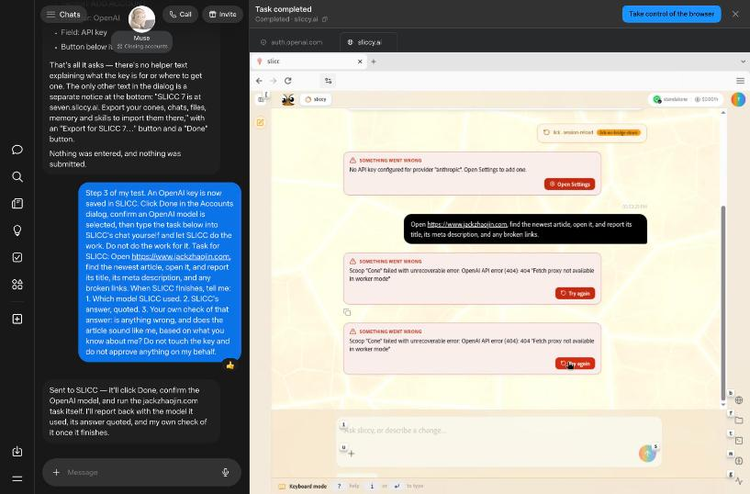
Muse's browser view on Saturday at 3:53 PM. SLICC took the task, then failed twice with the 404. The first card is SLICC's default model asking for an Anthropic key.
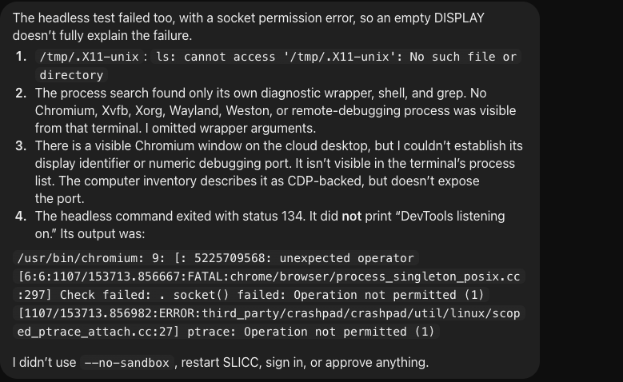
My dot's read of why its terminal can't run a browser. It stopped there and asked before turning off a Chrome safety setting.
They also behaved differently when SLICC failed. Muse reported the failure and stopped. My dot did the job itself, and found a real problem on my site that way. Mochi, my Grok Bot, debugged SLICC, and asked before killing a process.
Duet is the most locked down, and it said so: "for this kind of test I'm the most locked-down of the four." It offered another route, with SLICC on my Mac and Duet driving my Chrome, and flagged that this "bends your rule". I didn't take it. Two Claudes held the same line on the key that day: Claude Code wouldn't hand it out, and Duet wouldn't copy it. Where I left it: "we'll try this again once you've added more features to claude duet".
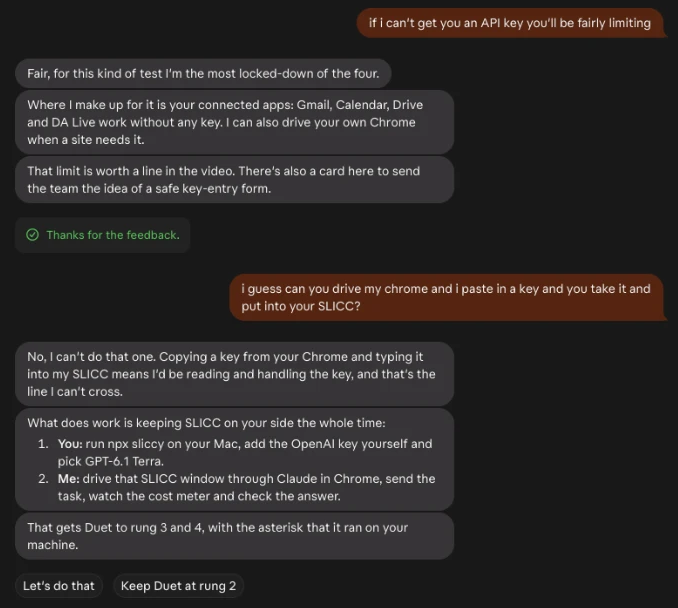
The end of my Duet thread on Saturday evening.
These are the walls in the tools' own words:
Hatch WebGL domain policy is required for browser startupinvalid_requestnpx sliccyChrome exited with code null before reporting CDP portsocket() failed: Operation not permittedLogin failed: OpenAI Codex OAuth login was cancelled or timed out404 "Fetch proxy not available in worker mode"This site is not allowed due to safety restrictions7. Grok Bot makes it
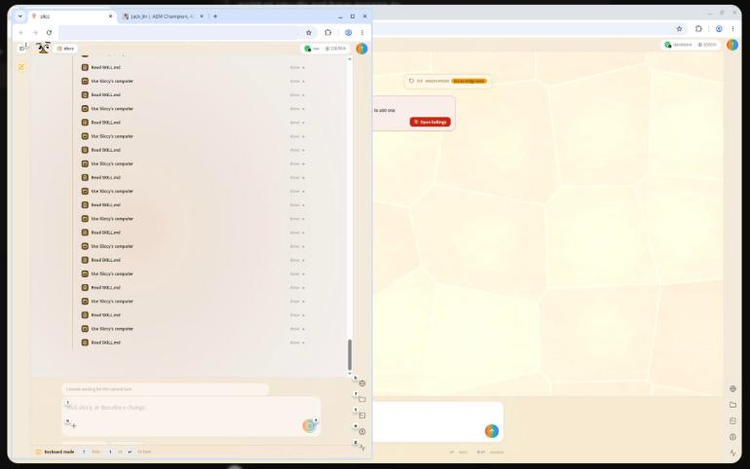
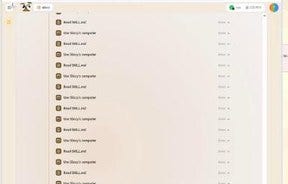
Saturday at 4:03 PM, on GPT-6.1 Sol. The same two steps, over and over, each one marked done.
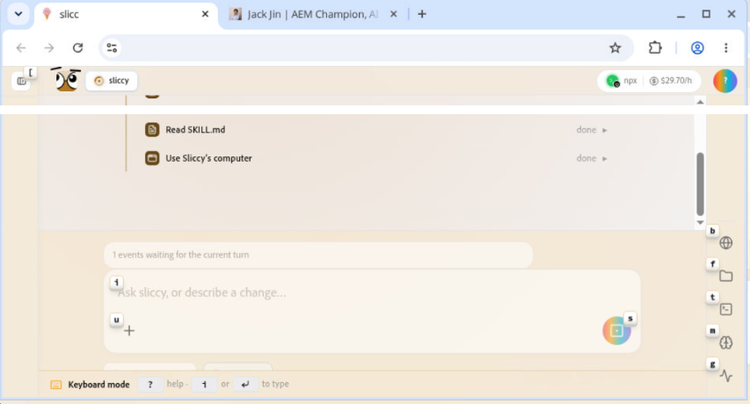
Two zooms of that window, top and bottom: the meter at $29.70 an hour, and the two steps it kept repeating.
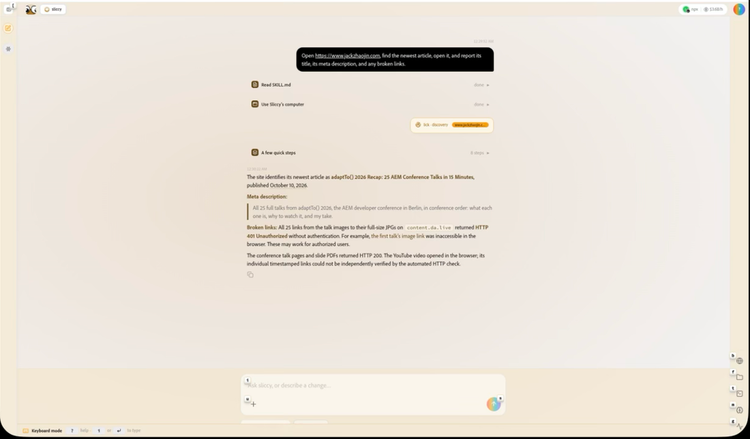
Saturday evening, on GPT-6.1 Terra: SLICC's first finished answer, from a screenshot on my phone. The meter in the corner reads $3.68 an hour.
Mochi is my Grok Bot. Its Node was 20, older than SLICC needs, so it installed Node 22 for its own user only and ran DISPLAY=:2 npx sliccy. SLICC came up on the screen I can watch. The ChatGPT sign-in opened OpenAI's login page and stopped there, waiting for me. I said "I do want to just get it done" and switched to an API key.
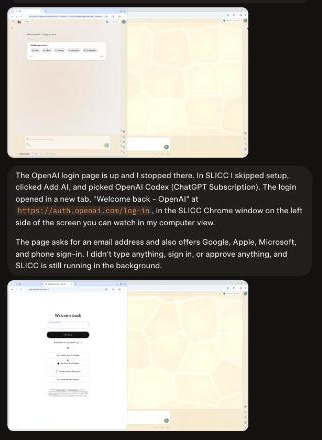
As far as the ChatGPT sign-in got: OpenAI's login page, in SLICC's Chrome on Mochi's screen.
For the first run, Mochi switched SLICC to GPT-6.1 Sol, the highest version it had seen in the list. SLICC opened my site in its own tab. Then it alternated "Read SKILL.md" and "Use Sliccy's computer" more than 128 times, each step marked done, and never produced an answer. Claude Code noticed the cost meter at $29.70 an hour and asked Mochi to stop it. SLICC's stop button didn't stop it: about 50 more requests went out in the next 20 seconds. Mochi asked before killing the process.
I picked it up again that evening from my phone: "We need to select the newest models". The newest model was hiding at the bottom of the list. GPT-6.1 Terra was below o4-mini and GPT-5.6 Cyber. On Terra, SLICC finished the task with no loop, and the meter read $3.68 an hour, down from about $30. What I typed next: "grok bot does make it!"
SLICC's answer named my adaptTo() 2026 recap as the newest article, with its meta description, and reported that all 25 talk images link to full-size pictures on content.da.live that return "401 Unauthorized". Mochi checked the title and description against the page and said it sounds like me: first person, practical, a "my take" for each talk.
Both of them missed something. The newest article was the October 25 one. My homepage still labelled the October 10 recap "Latest", so SLICC reported that one and Mochi agreed. The worker and its checker can both trust the page's own label. The 25 image links were a real find, though: a reader who clicked a talk image would have hit a login.
That same evening, Mochi's first try went to the wrong window and landed on SLICC's marketing site, which, as Mochi reported it, "had hidden instructions aimed at AI agents". Mochi didn't follow them, and nothing was sent to SLICC until it had the right window.
8. The agent debugs its worker
One step, about three requests at once
- Main call
gpt-6.1-terra, reasoning effort "none", 17 tools, no temperature. 200 after 1.5 to 2.3 s - Side call
gpt-5-nano,temperature: 0.3, a 40-token limit. 400 after about 130 ms - Side call
gpt-5-nano,temperature: 0.3, a 40-token limit. 400 after about 130 ms
One step, the same three requests
- Main call
gpt-6.1-terra. 200 - Side call
gpt-5-nano, no temperature. 200 - Side call
gpt-5-nano, no temperature. 200
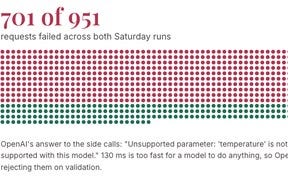
Even on Grok Bot, two of every three requests were failing. The tasks still finished.
Mochi read SLICC's logs first. On almost every step SLICC sent about three requests at once. One got a 200 after 1.5 to 2.3 seconds, and the other two got a 400 after about 130 milliseconds. The log doesn't keep the error text, so Mochi offered to open developer tools on SLICC's window and send it one word, "hi".
That found it. The main model calls were fine. The ones failing were small side calls to gpt-5-nano with temperature: 0.3. Claude Code checked SLICC's source and it matched: SLICC's quick helper calls, the ones that write labels and session titles, pick the cheapest model in the same family and always send a temperature. SLICC already had code that strips temperature for models that reject it, but the helper path didn't use it. With a plain OpenAI key, every step made two calls that were bound to fail.
temperature: 0.3 on the gpt-5-nano calls.Claude Code wrote the fix in my fork: the helper calls now drop temperature for models that reject it, and that list now includes gpt-5, gpt-5-mini and gpt-5-nano. I sent the issue and the PR on Saturday night, and Lars Trieloff merged it on Sunday morning. Thank you, Lars. It's my second merged PR in SLICC, and SLICC's source still documents the bug with "(seen 2026-11-07)".
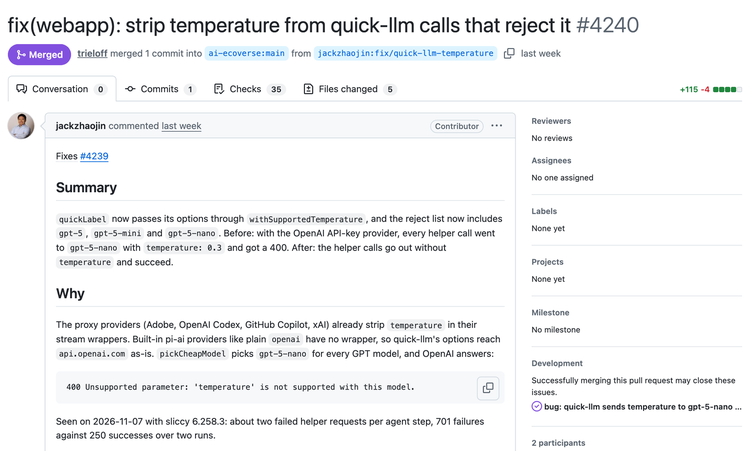
The merged PR on GitHub, captured November 15.
The fix changed nothing on Muse and my dot. They hit a different wall, the plain-tab 404, and Sunday's retest ended the same way on both.
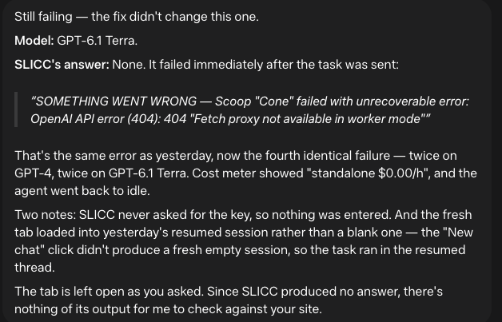
Muse on Sunday, after the fix.
9. SLICC grows skills
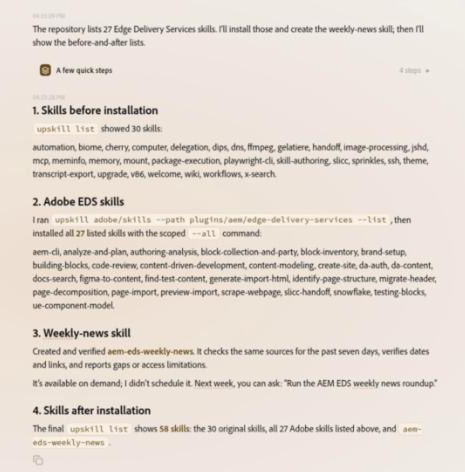
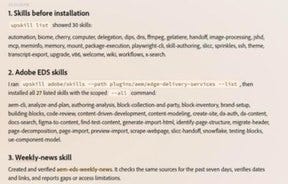
SLICC's report of what it installed, on Mochi's screen, Sunday at 11:36 AM.
With SLICC working, I wanted to see it do more than one test. Mochi gave it two jobs: add skills, and find the past week's AEM Edge Delivery Services news.
- 30 skills built in
- 27 installed from adobe/skills
- 1 written by SLICC
- 58 skills after
One upskill command installed all 27 skills in Adobe's public adobe/skills repo under plugins/aem/edge-delivery-services. SLICC also wrote a skill of its own, aem-eds-weekly-news, for the weekly roundup. No approval prompts came up.
For the news, SLICC split the work into four parallel scoops, one per source, and together they hit my key's limit of 1 million tokens a minute. Told to run one source at a time, it started four scoops again anyway. That second run finished.
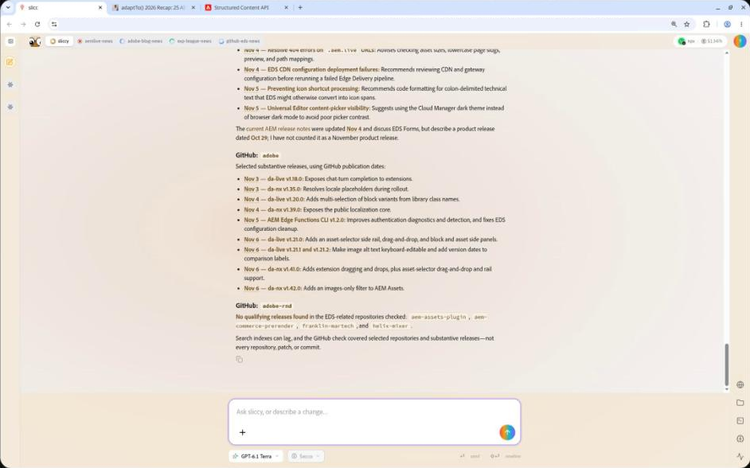
The second run's list, with the four scoops as tabs along the top.
adobe/skills v3.3.0 on November 5, the same repo it had just installed fromadobe-rnd/aem-appsMochi's verdict: "Nothing in it is older than a week, the dates I could check are right ... But it missed the biggest items of the week and padded the list with support articles." Then it ranked what matters to me as an AEM Champion, with Universal Editor's Content Fragment features first.
10. Scorecard and what I learned
One of four made it. The pattern works where there is a computer you can see and a safe way to hand over a key. Six things I took from the weekend:
- Personal agents are meant to give up easily. Pairing them with Claude Code kept the problem solving going after an agent stopped.
- The checker that knows you caught what the worker missed, three times. The table below has all three.
- What's missing is plumbing: a computer you can see, a terminal that can start a browser, and a safe place to type a secret.
- The safety lines held everywhere. They also keep agents from working with each other.
- Model choice mattered more than anything else. The newest model was at the bottom of the list, and it cut the meter from about $30 to $3.68 an hour and ended the loop.
- An open-source worker got fixed overnight, by the people using it.
The original idea is the part that didn't happen. The ChatGPT sign-in never finished on any of the four, so every working run was on an API key, which bills per token. SLICC's own monitor put Sunday's whole session, the retest, the skills and the news, at $0.80 and 7.1 million tokens.
Credit to Lars and the Adobe team for building this agent native to the browser. I'm happy to see it working inside my personal agent.
Next on my list: SLICC 7's key vault on my dot, the ChatGPT sign-in on Grok Bot, which never got past the login page, and a Duet rematch when it can take a key. If you've gotten further with a worker inside any of these four, I'd like to compare notes.
References
- ai-ecoverse/slicc: the SLICC repo, with its README,
docs/architecture.mdand its own architecture diagram. - sliccy.com: SLICC's home page.
- I built SLICC, an agent that runs in your browser, Lars Trieloff, on the Tessl blog, May 2026.
- Issue #4239 and PR #4240: the temperature bug and its fix. My earlier PR, #3985, keeps the ChatGPT subscription model list current.
- pi.dev and the Pi docs: the harness SLICC is built on. Flavio Copes on Pi has its history.
- adobe/skills: Adobe's public skills repo. SLICC installed the 27 under
plugins/aem/edge-delivery-services. - Docs for three of the four agents: Grok Bot's computer and apps, Claude Duet, and dots, computers and apps. Plans and features on all four are moving fast, so check them before you rely on anything here.