- Home
- Technical Writing
- Sites and AI
Sites and AI: Leveraging AI to Create and Maintain AEM Content
By Jack Jin · November 11, 2026 · Updated November 16, 2026 · 11 min read
Creating content with AI has never been easier, and it has never been harder to make it good. On November 11, 2026 I gave Adobe's Learn From Your Peers webinar on how I use AI across my own content work on an AEM Edge Delivery Services site: research and briefs, authoring, and evaluation, with three demos in each. This is that talk written down, with all nine demos.
Watch the recording on Adobe Experience League, or download the original deck as a PDF.
Never easier to make, never harder to make good
Most brands don't need a new page once or twice a day. Neither do I, if my personal website counts as a brand. I'd like a new article every two weeks. So I don't need AI to go faster at the same quality as before. I need it to help me produce the best content I'm able to.
Six months ago it was cool to show how much you made with AI. The tone has changed, and there is a real pushback against AI slop. Everyone has the same AI, so the bar went up.
I'm a technical architect, and I've always struggled with writing. AI lets people like me get our ideas out. That doesn't mean an article deserves less effort. What you publish still represents you, and your readers, human or AI, should get the best you're able to produce.
Trust comes before scale
So how do you start using AI without adding to the slop? The idea that explains it best for me comes from Lauren Tan, an engineer at Cursor: you build trust with AI before you hand it more. Trust goes up the side, and how much you hand to AI goes along the bottom.
The biggest pitfall is starting at the far end. Ask AI to do the research, write the post and check it, and you will most likely get work you can't put your signature on.
Start the way you'd bring on a new teammate. You don't hand a new hire your homepage on day one.
- You
- AI
- You pick one small job
- You write the prompt
- AI do the job
- You read every answer
- You refine the prompt where it slipped
- AI do the job again
- You see what changed, and get a feel for it
- AI repeat it on more of the same work
- You keep the process that works
- AI do it on every page
- AI take on the next job too
- AI sum up what it did
- You approve it, or send it back
The rest follows the three stages of my own content work, with three demos in each, all recorded on my own site. This is what I do, not a list of best practices.
Research and briefs
Getting the right context in.
Authoring
Reducing friction.
Evaluation
Closing the loop.
Research and briefs: getting the right context in
Every page starts before anyone writes a word. I have AI research the topic first, and I hand it three things.
It reads more than you can
Docs, release notes, blog posts, forum threads. AI reads them in minutes and pulls out what your readers keep asking.
It spots what's missing
Put your page next to the ones you compete with. AI lists what they cover that you don't.
It keeps watching
Run the same research every week and it tells you what changed, before your readers ask.
For me it's usually not a brand new topic. I tell AI what I know, what I think is true and where I'm less sure, and it checks what I believe. When I ran the gap check on one of my own articles, two of the pages I compete with had a comparison table and question headings. Mine had neither. And a scheduled job in ChatGPT tells me every week what changed in Edge Delivery Services, so I can learn it, and maybe write about it.
Demo 1.1: My beliefs come first
Before I open any AI, I write down what I believe. Three lines. Then AI does the research, and it reads more than I could in an afternoon. Then I read what came back myself. That part is mine.
Here I'm about to write about AEM Edge Functions, so I give Claude's Research my three beliefs. They run my code on Adobe's CDN. They're WebAssembly on Fastly, like Cloudflare Workers. And I got them running on my laptop, but I don't know their limits yet. Every claim needs a source, and if there's no source, it has to say so.
Demo 1.1: The research assistant
Claude Research on AEM Edge Functions: 292 sources in 5 min 38 s, sped up.
It went through 292 sources in 5 minutes 38 seconds and gave each belief a verdict: the first two partly supported, the third supported, and the limits I said I didn't know were right there. I don't take its word for it. I open one source and find the claim in Adobe's own docs.
AI doesn't care that you're wrong, and it doesn't judge you. The only person who could fact check me used to be someone more senior who also knew the project, and that person is hard to get. I knew more than when I started, and I still hadn't written a word.
Demo 1.2: Talking is input
I'm better at demoing and talking things through than I am at writing, so talking is my input. A recording becomes a transcript, the transcript becomes a brief in my words, and the brief becomes a page.
This one starts from 12 minutes and 23 seconds of me sharing my screen and talking through a migration, with no script. I ask for a brief from the transcript: my order, my own words, and nothing I didn't say. It comes back with three quotes, each with its timestamp, and it flags what it couldn't confirm.
Demo 1.2: From my recording to writing
My 12:23 recording, the brief from it, and the page it became.
I ask for that flag because AI can add things you didn't say. The coverage map at the end of the clip is how I check: every moment of the recording has a place on the page.
Fifteen minutes of me talking about something I researched is original material, and that is how I keep the slop out. If you have a call with your brand manager before you write, get that transcript in. Adobe does this at enterprise scale: GenStudio for Content Marketing turns long documents and videos into web articles.
Demo 1.3: My second brain is plain files
This is the advanced one: give AI a large context of you. Mine is plain files: my talks, how I write and speak, my goals, the research I've already done. None of that changes day to day. For a company, that is the brand, and Adobe calls its version Brand Intelligence.
In the clip I ask Claude Code which talks I gave in 2026 and how I usually open one, and it answers from my own files. Then I ask for a brief for a new article from what I've already said, and every point cites a file and a line.
I read that brief before I open the editor, top down, while changing direction is still quick. The closer the first draft is to right, the less editing I do later. Hold on to this brief, because the next stage builds it.
Authoring: reducing friction
How does the brief turn into a page? Usually by copy and paste. The draft lives in a doc, the page lives in AEM, and somebody moves it over one block at a time. The layout drifts from the design, small fixes wait in someone's queue, and once it's live, nobody can tell you exactly what changed, or when.
The morning of the webinar gave me an example of the opposite. I had taken the day off, and I was still in bed. At 9:30 I picked up my phone and asked Claude Code to publish the deck on my site and make sure it showed up in the listing, an hour and a half before I presented from it.
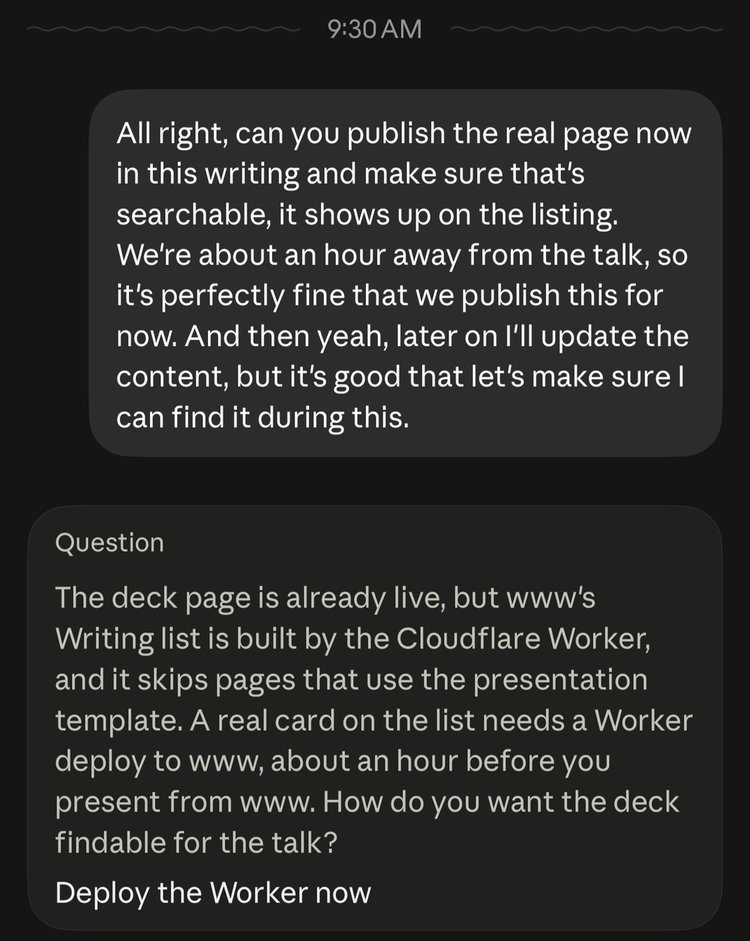
Bring the authoring interface to where you are. For me that's Claude Code. For you it might be Experience Workspace, or your own agent.
Demo 2.1: Start with one small ask
The smallest start. The assistant sits beside the page in Experience Workspace. It knows your site and what your blocks let it edit. It doesn't know your intent unless you tell it.
I make one small ask: make the title clearer for someone choosing between the three ways to author, keep it under 60 characters, and keep my block. It reads the page first, picks a shorter title, and stops. Nothing changes until I approve. Then I send it to preview.
Demo 2.2: My blocks are the design system
There's a trend across MarTech right now: platforms letting other agents do the work, without their interfaces. I call it working headless. The content still lives in AEM. The agent just doesn't need the screens. The next two demos are that, on my own site.
My blocks are my design system. They're all in the Library inside Experience Workspace, each variant with what it's for and an example from a real page. Authors see this, and AI reads the same thing. So I ask Claude Code for a page plan from the brief, library blocks only.
Demo 2.2: AI that knows my block library
Headless in Claude Code: a plan from my library, and the parts it has no block for.
It came back with eleven library blocks and three gaps: three things it has no block for, a pull quote for one. It said so instead of making one up.
Review that mapping before anything gets built. AI guesses right about 90% of the time, I would say, but you're the one putting your signature on the page. Say when you'd choose a different block. Voice to text is enough.
Demo 2.3: AI tests itself before I look
This is my own setup, and it's headless all the way: my site, my second brain and my tools in one Claude Code session. The brief goes in with two instructions. Push it to preview only, never publish. And check your own work before you hand it to me.
The run took 22 minutes and 34 seconds. It wrote the page into my blocks, then checked it on desktop and phone, in light and dark. A code block overflowed on phones, so it fixed that and ran again. One rerun tested an old preview, so it said that one didn't count, and it waited for the fresh page.
Demo 2.3: Claude Code with everything wired in
Built headless, still editable in Experience Workspace. On preview, 404 on live.
Only then do I open it. All 104 authored texts were still editable, so a page built headless is still one my authors can change word by word.
If you don't have AI go through this loop, you become AI's tester. When someone tells me AI didn't give them what they wanted, I ask two things. What did you give it to begin with? And did you ask it to check the work before it handed it to you?
Evaluation: closing the loop
How do you know it's good before it goes live? Most of us find out after. We proofread, we publish, and weeks later the analytics tell us what we missed. The check comes last, when a fix costs the most. And almost nobody checks the page against what it was supposed to answer in the first place.
Authoring that used to take four hours now takes fifteen or twenty minutes, so this is the stage where a page clears the bar, or doesn't. To me it's the most important of the three. I run three kinds of checks, in this order, because each one catches what the others miss.
Deterministic checks
Rules a script runs the same way every time: title length, one h1, structured data, links, alt text. Experience Workspace's Preflight panel has some built in.
Agentic checks
AI reads the page like a reviewer would: does it answer the brief, how does it compare, what would a reader still ask.
Human checks
You read it against the brief and make the call: the voice, the judgment, whether it's worth publishing at all. It's the last check, not the only one.
Demo 3.1: Rules first
Same input, same answer, every time, and no AI. Experience Workspace has this built in as Preflight. On this draft it reports 6 failed and 19 passed, and running it again gives the same answer. One finding is a link that came back 404, with a suggested fix. I had AI break a few things first, so there would be something to show.
The second half of the clip checks the whole published site the same way. Not everything has to burn tokens. If a rule can check it, use the rule, and have AI run the rule for you. It costs less, and the answer is the same every time.
Demo 3.2: A reviewer with my voice rules
Rules can't judge everything, so the next check has judgment: a reviewer that loads my voice rules first. I have words I never use. Load-bearing is one. I've also saved my best emails and posts as examples of how I sound. There are three ways out: pass, auto-revise, or ask me. Anything that changes the meaning comes to me.
Here it runs on the raw AI draft of a real LinkedIn post. The mechanical scans found nothing. But one line was wrong: "This time it took two prompts." My point in the video was a long planning conversation plus two build prompts. It didn't touch the draft. It proposed an edit and asked me.
As a technical architect, I've been wrong, and I don't think there's a technical architect or content author who hasn't. This is my last check before I hit post. Point it at a page instead of a post, and it's your brand's reviewer.
Demo 3.3: It's OK to clean it up yourself
AI takes me 80 to 90 percent of the way. I'm the expert, and it's OK to clean up the rest myself. A lot of AI systems are a black box: to change what AI made, you have to go back through their AI. Here I open Experience Workspace, da.live if that's what you still call it, select a line that reads a bit stiff, and retype it in plainer words, with no prompt.
When I find myself fixing the same thing over and over, that's a pattern, and it goes back into the skill or the process.
Does the page still match what we meant?
That's the question across all three stages. Research and briefs gets your context in: what you believe, what you've said, what you've already made. Authoring lets AI do the work and test it before you look. Evaluation runs the checks in order: deterministic, agentic, human.
Context in, friction down, loop closed. That's how a page clears the bar, and at every stage trust grows one step at a time.
Everything here is how I work on my own site, and parts of it would look different in an enterprise.
Three things to try on Monday
- Before your next page, write down three things you believe, then run a research assistant on the topic and read what comes back.
- Open one real page in Experience Workspace and ask the assistant for one small fix.
- Run Preflight on your next page before it publishes.
Start small. I've gotten stronger with AI as I keep building trust, and I still build it every day in my day job.
If you've automated any of this already, I'd like to compare notes. I learn more from conversations than I do from giving talks.
Questions from the session
Three of the questions from the audience, with my answers shortened.
What if you don't have strong beliefs about the topic to start from?
If you don't know something about a topic, maybe you shouldn't write about it. Start from expertise, yours or your client's. Even now, when it all seems so easy, the writing has to be something about you.
Which of your skills can't you live without?
The one that sounds like me. When I rehearse a talk, I have Claude record how I speak, so over time it knows how I talk and how I'd like to communicate. The skill merges the two and keeps out the words I'd never say. My video skills are second. For these demos I recorded about 40 minutes of my screen and told AI what the talk was about. It found and cut the clips, and told me when one was missing.
How do you fact check AI before you trust it?
Ask for variations. Nobody writes a perfect prompt, and I'm far from it. I still want one thing, but I have AI make six, and I pick. Sometimes all six miss. The morning of this webinar I asked for new versions of my title slide, and I couldn't get one I'd put my name on, so I kept the slide I had. Sometimes AI fails, and you're the judge of what's good.
References
- The recording of the webinar on Adobe Experience League: about an hour, with the questions at the end.
- The original deck (PDF), as I sent it to Adobe the evening before.
- The trust curve is Lauren Tan's idea (@poteto): trust against the number of agents.
- www.jackzhaojin.com, the site in every demo, and archive.jackzhaojin.com, the record of every publish (github.com/jackzhaojin/www-archive).
- Building an MCP Server for EDS da.live
- One da.live MCP Server Across Claude, Gemini, Azure OpenAI and n8n
- Agentic Admin API Configuration for Edge Delivery Services